
Last updated on
Oct 31, 2026
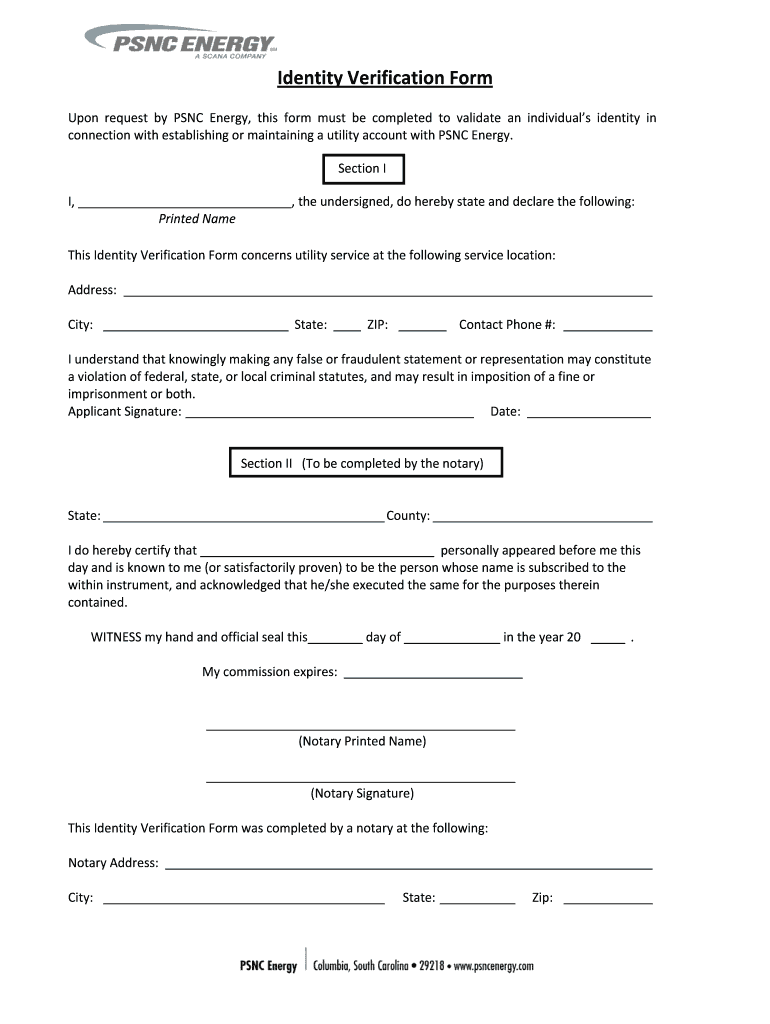
PSNC Energy Identity Verification Form free printable template
We are not affiliated with any brand or entity on this form

Fill out
Complete the form online in a simple drag-and-drop editor.

eSign
Add your legally binding signature or send the form for signing.

Share
Share the form via a link, letting anyone fill it out from any device.

Export
Download, print, email, or move the form to your cloud storage.
Why pdfFiller is the best tool for your documents and forms


End-to-end document management
From editing and signing to collaboration and tracking, pdfFiller has everything you need to get your documents done quickly and efficiently.
Accessible from anywhere
pdfFiller is fully cloud-based. This means you can edit, sign, and share documents from anywhere using your computer, smartphone, or tablet.
Secure and compliant
pdfFiller lets you securely manage documents following global laws like ESIGN, CCPA, and GDPR. It's also HIPAA and SOC 2 compliant.
What is PSNC Energy Identity Verification Form
The Identity Verification Form is a document used by PSNC Energy to validate an individual's identity when establishing or maintaining a utility account.
pdfFiller scores top ratings on review platforms




The program was very easy to use, and there were many options to help fill out the forms
i have been able to use with minimal problems
Who needs PSNC Energy Identity Verification Form?
Explore how professionals across industries use pdfFiller.

PSNC Energy Identity Verification Form is needed by:
-
Utility account applicants in North Carolina
-
Notaries verifying identities for documents
-
Businesses requiring notarized identity confirmation
-
Individuals updating their PSNC Energy accounts
-
Customers needing utility services from PSNC Energy
Comprehensive Guide to PSNC Energy Identity Verification Form
What is the Identity Verification Form?
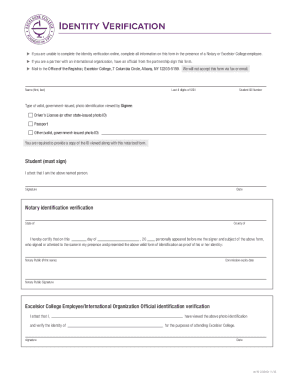
The Identity Verification Form is essential for validating an individual's identity when establishing or maintaining a utility account with PSNC Energy. It serves as a framework to ensure the integrity of customer information, emphasizing the importance of notarization to authenticate the applicant's identity. In North Carolina, this form includes specific fields that require attention, including the applicant's printed name, address, and signature.
Purpose and Benefits of the Identity Verification Form
This form plays a crucial role in validating identity for utility services, allowing PSNC Energy to verify customer credentials reliably. The notarized identity form benefits both applicants and the utility company by providing an additional layer of security and ensuring compliance with state regulations. Applicants can enjoy peace of mind knowing their information is protected, while utility companies safeguard their services against fraud.
Who Needs to Complete the Identity Verification Form?
Individuals who are establishing or maintaining a utility account with PSNC Energy must complete this form. Both applicants and notaries are required to sign the document. The applicant submits their personal information, while the notary certifies the authenticity of the applicant's identity. This requirement ensures accountability and trust in the verification process.
Eligibility Criteria for the Identity Verification Form
Certain criteria determine who qualifies to fill out the Identity Verification Form. Residents of North Carolina are subject to specific rules that govern their eligibility. Applicants must provide valid identification and meet all requirements outlined by PSNC Energy to ensure their application is processed efficiently.
How to Fill Out the Identity Verification Form Online
Completing the Identity Verification Form online through pdfFiller is a straightforward process. Follow these steps:
-
Access the form on the pdfFiller platform.
-
Fill out the required fields, ensuring accurate and complete information.
-
Pay special attention to sections that require notarization.
-
Review the completed form for any mistakes.
-
Submit the form for notarization if necessary.
Required Documents and Supporting Materials
To successfully complete the Identity Verification Form, applicants must gather several essential documents. These documents may include:
-
A valid government-issued ID.
-
Proof of residence in North Carolina.
-
Any supplementary material as specified by PSNC Energy.
Having these documents ready can streamline the verification process.
Submission Methods for the Identity Verification Form
Once the Identity Verification Form is completed and notarized, applicants can submit it to PSNC Energy through various methods. The available options include:
-
Faxing the completed form directly to the utility company.
-
Mailing the document to the designated PSNC Energy address.
It's important to be aware of any deadlines or processing times that may affect your application status.
Common Errors and How to Avoid Them
Applicants often encounter pitfalls when filling out the Identity Verification Form. The most frequent mistakes include:
-
Leaving required fields blank.
-
Providing incorrect information that lacks clarity.
-
Neglecting the notarization process.
Taking care to double-check all details can help ensure acceptance by PSNC Energy.
Security and Compliance for the Identity Verification Form
When using pdfFiller, applicants can trust that their personal information is secure during the form-filling process. The platform adheres to stringent security measures, including 256-bit encryption and compliance with privacy laws such as HIPAA and GDPR. This commitment to data protection ensures that sensitive information remains confidential.
Get Started with pdfFiller Today
For anyone needing to fill out and notarize the Identity Verification Form, utilizing pdfFiller provides a user-friendly experience. The software's advantages include ease of use, robust security features, and accessibility from any browser. Start leveraging pdfFiller to streamline your document management needs.
How to fill out the PSNC Energy Identity Verification Form
-
1.Begin by accessing the Identity Verification Form on pdfFiller. Navigate to your pdfFiller account and use the search bar to locate the form by typing 'Identity Verification Form.'
-
2.Once the form appears, click on it to open in the editor. Familiarize yourself with the layout and the required fields to ensure a smooth filling process.
-
3.Gather all necessary information before filling out the form, including your full printed name, your residential address, and your signature. Ensure that you have a valid form of identification ready to reference if needed.
-
4.In the form fields, start by entering your printed name in the designated area. Be sure to type clearly and accurately to avoid any issues.
-
5.Next, fill in your address in the corresponding field. Double-check for accuracy, as any discrepancies may delay the processing of your utility account.
-
6.Proceed to enter your signature in the signature box provided. Use a stylus or mouse to create a clear signature.
-
7.After completing your portion of the form, review all fields meticulously. Ensure all information is correct and nothing is omitted.
-
8.Once reviewed, save your work by clicking on the 'Save' button. You can also choose to download a copy for your records by selecting ‘Download’ from the options menu.
-
9.Finally, follow the submission instructions outlined for the form. Generally, you will need to print the completed form and send it via fax and mail to PSNC Energy's designated address.

Who is eligible to complete the Identity Verification Form?
Any individual who is establishing or maintaining a utility account with PSNC Energy in North Carolina is eligible to complete this form.
Are there any deadlines for submitting the Identity Verification Form?
While completion and submission should ideally occur as soon as you begin your utility service process, specific deadlines may apply based on your account needs or PSNC Energy policies.
What methods can I use to submit the Identity Verification Form?
The completed Identity Verification Form should be printed, and both faxed and mailed to PSNC Energy to ensure your utility service initiation or update.
What supporting documents are required along with the Identity Verification Form?
In most cases, you'll need to provide a valid form of identification, such as a driver's license or passport, alongside the completed Identity Verification Form for notarization.
What common mistakes should I avoid when filling out this form?
Make sure all fields are filled out accurately, avoid typographical errors, and ensure the form is notarized properly before submission to prevent any processing delays.
How long does it usually take to process the Identity Verification Form?
Processing times can vary, but expect it to take a few business days once PSNC Energy receives your form. For urgent cases, contact their customer service for assistance.
Is notarization required for the Identity Verification Form?
Yes, notarization is required for the Identity Verification Form, as it certifies the identity of the applicant, ensuring document validity.
Related Content
Related Forms




Related Catalogs
Get the latest insights from our blog


If you believe that this page should be taken down, please follow our DMCA take down process
here
.
This form may include fields for payment information. Data entered in these fields is not covered by PCI DSS compliance.